Talk to the Media Supply Experts at 1-800-944-4237
home  \\  about us  \\  shipping info  \\  customer services  \\  contact us  \\  shopping cart
CD Recordable, CD & DVD Duplicators And Recording Devices - Media Supply
Affordable, Reliable, Disc Publishing for the Beginner

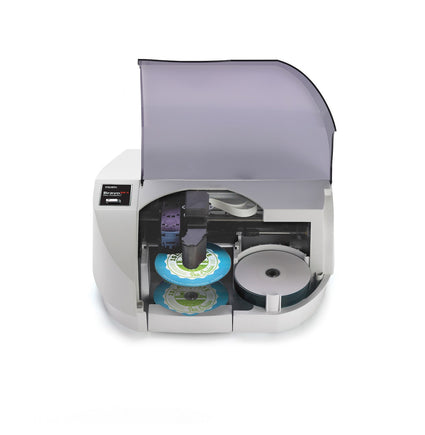
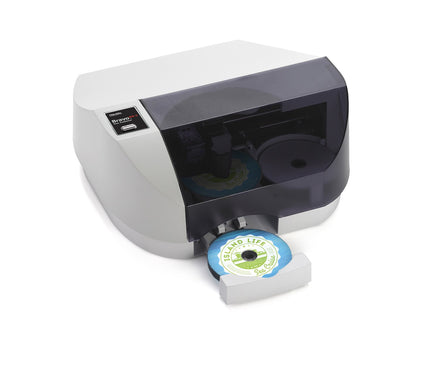
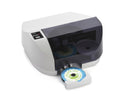
Primera Bravo SE Disc Publisher-63101

Part Number: PRI63101-1
Availability: Usually ships the same business day.
Price $1,289.00


Manufacturer
Primera Technologies
Manufacturer Part Number
63101
Warranty
One year parts and labor; optional extented warranties available.
Ext. Warranty
Additional Year - $175, Two Additional Years - $300
Write Drives
Latest Pioneer drive
Hard Drive
No HDD - Works with PC or MAC.
For the PC: Primera PTPublisher SureThing CD Label Software Primera Edition For the Mac: CharisMac Engineering's Discribe
Supported Formats
Minimum System Requirements for PC For PC: Pentium III processor at 700MHz or higher, 500MB or more RAM, available USB 2.0 port, NTFS drive partition Minimum System Requirements for Mac Computers For Mac: 700MHz PowerPC G4 or higher or Intel Solo or Duo Core� processor, 256 MB or more of RAM, available USB 2.0 port
Opt. Port Connect
USB 2.0 Required
Capacity
20 Discs
Write Speed
16x DVD/52x CD Recording
Description:

Free FEDEX Ground Shipping!

Affordable, Reliable, Disc Publishing for the Beginner- Media Supply introduces the new Primera Bravo SE DVD/CD Publishing System.

Primera's Bravo SE Disc Publisher is the way to go if you've been burning DVDs and CDs with your PC and want to move up to a fully automated system without a big investment. Designed for the entry level user, this little machine has a small desktop footprint and a new version of the popular Primera software that is unique to the Bravo SE and simple to run right out of the box. Because of the proven automation, the simple interface that will copy disc to disc, music discs and discs from image files, and the high quality of the inkjet printing, we've heard nothing but good things about the Bravo SE from our customers.

The Primera Bravo SE Disc Publisher produces up to 20 discs at a time, burning DVDs at 16x or CDs at 52x before printing them at up to 4800 dpi.

Burn and Print DVDs and CDs Automatically with the Primera Bravo SE Disc Publisher!

  • Burn and Print up to 20 Discs without reloading
  • Full-Color 4800 dpi Direct-to-Disc Printing
  • Easy to Use
  • Includes Burning and Printing Software for WindowXP/2000 and Mac
The Primera Bravo SE Disc Publisher uses sixth-generation robotics that make burning and printing discs as easy as possible.

Here's how the Primera Bravo SE Disc Publisher process works:
  1. Bravo SE's robot arm picks a blank disc from the input bin.
  2. The disc is placed into the integrated Pioneer DVD/CD recorder.
  3. The disc is burned.
  4. The robot moves the disc to the built-in, 4800 dpi direct-to-disc inkjet color printer.
  5. The disc is printed.
  6. The robot picks the disc from the printer, places it into the output bin and starts over again.
Bravo SE does all of the work for you, unattended and automatically, saving you time and money on every disc you produce!

Simple Installation and Operation of Primera Bravo SE Disc Publisher
The installation and operation of the Primera Bravo SE Disc Publisher is quick and easy. Simply connect one cable, install one cartridge, load one Bravo SE software program and start burning and printing discs in a matter of minutes.

Free Tech Support
Primera now offers free phone support, for the life of the product, on the Primera Bravo SE.

NOW, NEW LOWER COSTS PER DISC ON BRAVO SE!
We're pleased to announce that users of Bravo SE can now choose between standard-yield and high-yield ink cartridges. Part numbers are:

53332 Color Ink Cartridge (Standard-Yield; this is the current SE ink cartridge) 53335 Color Ink Cartridge (High-Yield)

The 53335 Color Ink Cartridge, which is exactly the same cartridge as used on BravoPro, has almost twice as much ink as the standard Bravo SE ink cartridge. For heavy users, this is very good news since cost per disc will go down by as much as 44%!

To use the 53335 High-Yield ink cartridges on SE, you MUST download new versions of firmware and the printer driver. Just follow these links:

http://www.primera.com/firmware_upgrade.html
http://www.primera.com/primera_printer_drivers.html
Locate the SE updates on each page. Download and install them as directed.

The 53332 Standard-Yield cartridges will continue to work as before. These cartridges have a lower initial purchase price, so you may still want to use them, especially if your volumes of discs printed are lower.

We've created a Knowledge Base article that describes the ink cartridge upgrade process in detail. You can view it at: http://server.iad.liveperson.net/hc/s-77406906/cmd/kbresource/kb-5849063687456898919/view_question!PAGETYPE?sq=53335%2b53332&sf=101113&sg=1&st=467990&documentid=232750&action=view

Download a Bravo SE product brochure in PDF format (170 kb)

Primera Technology PTrip Software

Free for a limited time, Primera Technology is offering downloadable software that will turn your Primera Bravo Series equipment into an iPod or mp3 player loading machine. How Fun!
  1. Simply place your music cds into the input bin
  2. Launch PTRip Software from your computer screen
  3. Finally, click "Load to iTunes" or "Load to Windows Media Player."
PTRip supports Primera’s Bravo SE, Bravo II, BravoPro and Bravo XR/XRP Disc Publishers. The software will be priced at $99.00 (MSRP), but is available for a limited time at no charge. Visit www.mediasupply.com/ptrip to find out more!


Media Supply, Inc. \\ 611 Jeffers Circle \\ Exton, PA 19341

1-800-944-4237